Why is my game running badly?
Frame Hamster checks your PC in five seconds, tells you what's wrong in plain words, fixes it in one click (with an Undo for everything), and proves it with real FPS numbers. If your PC is already fine, it says so.
Scan. Explain. Fix. Prove.
Most "FPS boosters" flip a hundred switches and hope. Frame Hamster measures first, explains the real cause, fixes just that, and measures again.
Scan
Graphics card, screen, memory, power, Windows settings, background apps. Changes nothing.
Explain
Every problem in one plain sentence: what it is and why it costs you frames.
Fix
One click, and an Undo for every change. Or follow the free step-by-step to do it yourself.
Prove
Play for a minute before and after. Real FPS, 1% lows and stutters, counted frame by frame.
The boring problems that cost the most FPS
These are the real reasons games run badly, and the big tools mostly skip them.
Honest, even when there's nothing to fix
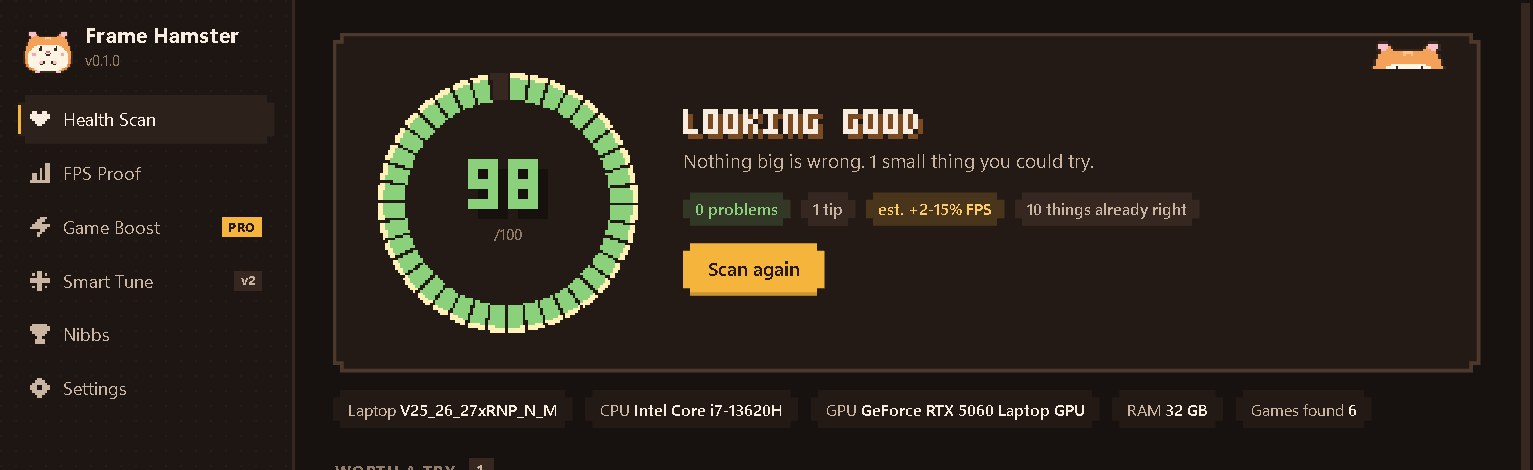
A real scan on a Clevo laptop with an RTX 5060. It was already tuned, so it scored 98 and said so. No fake "47 issues found".
No snake oil. Just measured fixes.
We won't "clean your registry" or disable your antivirus for 2 FPS. Memory Integrity and Defender stay on: if a security setting costs FPS, we explain the trade-off and let you decide. Every change is saved first, so "Restore everything" really puts everything back.
Numbers, not feelings
Start any game, press Record, play for a minute. Frame Hamster counts every frame with Intel's PresentMon (it reads Windows' own frame events, so it never touches the game or its anti-cheat). Do it before and after a fix.
+37% average FPS · 1% low 38 → 58 · stutters 14 → 6. The hamster's wheel spins faster the more you gain.
He lives in your PC and powers it on his wheel
He listens with his stethoscope while scanning, puts on a hard hat to fix things, sweats when your PC runs hot, and naps in his wheel when everything is fine. Earn trophies and he gets new outfits. Try some on:
He stays in his corner, never pops up during a game, and you can shrink or hide him.
Find the problem for free. Fix it in one click with Pro.
Free
Everything you need to find out what's wrong.
- Health Scan + score, every problem explained
- Step-by-step fixes to do yourself
- FPS Proof: average FPS, 1% lows, stutters, frame-time chart
- Shareable scorecard + "Restore everything"
- Hamish, his trophies and outfits
- One-click fixes
- Game Boost, Smart Tune, Stutter Detective
Pro
One payment. No subscription. Ever.
- Everything in Free
- Fix everything the scan finds in one click (always undoable)
- Game Boost: every game in speed mode on its own, plus Cooler CPU for laptops
- Smart Tune (NVIDIA): your graphics card's undervolt / overclock sweet spot, stress-tested for you, then one click after every restart (tested: −13 W same speed, or +9% speed, on an RTX 5060 laptop)
- Stutter Detective: finds out why your game stutters
- Before → after FPS comparison, automatic FPS checks, temperature check-up over time
- 2 PCs, free updates
Or buy Hamish a sunflower seed 🌻
A small donation keeps Frame Hamster growing. He wears a sunflower to say thank you (in the app too).
Fix it yourself
The same fixes the app does, step by step. No app needed.
Questions
Is it safe? What does it change?
The scan only reads. Nothing changes until you press a Fix button, and every fix saves the old value first, so its Undo (or "Restore everything") puts it back exactly.
Will it turn off my antivirus or Memory Integrity?
Never. Security settings are never changed for you. If one costs FPS, Frame Hamster explains the trade-off and shows where the setting is, so the choice stays yours.
Does it touch my games? Anti-cheat?
No. It never injects into games or edits game files. FPS Proof reads Windows' own frame events with Intel's PresentMon, the same way the big benchmarking tools do.
Why does FPS Proof ask for admin?
Windows only lets programs read frame timing events with admin rights, so it asks once per recording. That's the only reason.
Laptop or desktop? NVIDIA, AMD, Intel?
Both laptops and desktops, on Windows 10 and 11, with NVIDIA or Intel graphics. Smart Tune and the temperature check-up need an NVIDIA graphics card. AMD Radeon support is coming soon: on a Radeon-only PC the free scan still works, but you can't buy Pro yet, so you never pay for something that won't work.
Is Smart Tune (undervolt / overclock) safe?
It changes only what NVIDIA's own driver allows, in small steps and well inside your card's limits, without raising voltage or power limits. Each step is stress-tested with a self-checking test, it stops if the card gets hot, and it keeps two steps of safety margin. If something crashes, your card is back to stock by itself (the driver resets the settings, and a watchdog does too). Nothing tuned is ever applied at start-up unless you apply it. No MSI Afterburner needed.
What if my PC is already fine?
Then we tell you, plainly. Sometimes the honest answer is "your PC is set up right, the game is just heavy". FPS Proof then shows whether your graphics card or your processor is the limit.
How does Pro work?
Pay once with PayPal, get a key (FH-...), paste it in the app. It works on 2 PCs and includes every v1 and v2 update. Questions: raiyanaukeli@gmail.com.